golars scripting language (.glr)
.glr files are a tiny, line-oriented language for pipeline-style DataFrame work. Every REPL command is a script statement.
.glr files are a tiny, line-oriented language for pipeline-style
DataFrame work. Designed to feel like "your REPL session in a file",
nothing more. Every REPL command you know is also a script statement.
# trades-daily.glr
load data/trades.csv          as trades
load data/symbols.csv         as symbols

use trades
filter volume > 100
groupby symbol amount:sum:total
join symbols on symbol
sort total desc
limit 10
show
Run it:
golars run trades-daily.glr # one-shotFrom inside the REPL:
golars » .source trades-daily.glrGrammar
program      = { statement NL } ;
statement    = empty
             | comment
             | command ;
comment      = "#" { any-char-until-NL } ;
command      = [ "." ] identifier { arg } ;
arg          = identifier | number | string | operator | list | "as" | "on" ;
list         = "[" [ arg { "," arg } ] "]" ;
string       = '"' { any-char } '"' ;
identifier   = ( letter | "_" ) { letter | digit | "_" | "." | "-" | "/" | ":" } ;
number       = [ "-" ] digit { digit } [ "." digit { digit } ] ;
operator     = "==" | "!=" | "<=" | ">=" | "<" | ">" | "and" | "or" ;
That is the statement level. filter, with, select and groupby
hand the rest of the line to the
expression language.
Statements are line-terminated. A trailing \ (after any trailing
whitespace) continues onto the next physical line, useful for long
filter predicates:
filter salary > 100000 \
  and dept == "eng" \
  and tenure_years >= 2
The leading . on every command is optional: load foo.csv and
.load foo.csv do the same thing. A # inside a "..." string is
treated as a literal - only unquoted # starts a comment.
If you mis-spell a command golars tries to be helpful:
$ golars run typo.glr
typo.glr:3: unknown command "filtet" (did you mean "filter"?)
Statement reference
Commands are grouped the way .help prints them. The canonical list,
with signatures and hover text, lives in script/spec.go; the REPL,
the LSP, the Jupyter kernel and the editor grammars all read from it.
Aliases are listed next to the command they stand for.
Three kinds of statement behave differently:
- Pipeline statements add a lazy step to the focused frame.
Nothing runs until something collects (
show,head,save, ...). - Reshape statements have no lazy form. They collect the focus, transform it, and make the result the new focus.
- Inspect and aggregate statements print something and leave the focus unchanged.
io
| Statement | What it does |
|---|---|
load PATH | Focus a new frame. Formats come from the extension: .csv, .tsv, .parquet/.pq, .arrow/.ipc, .json, .ndjson/.jsonl. Empty CSV fields read as null. |
load PATH as NAME | Stage a frame under NAME without touching the focus. |
save PATH (alias write) | Collect the focused pipeline and write it; the format comes from the extension. |
scan_csv PATH [as NAME] | Register a lazy CSV scan (push-down friendly). A .tsv path keeps the tab delimiter. |
scan_parquet PATH [as NAME] | Lazy Parquet scan. |
scan_ipc PATH [as NAME] (alias scan_arrow) | Lazy Arrow IPC scan. |
scan_json PATH [as NAME] | Lazy JSON scan. |
scan_ndjson PATH [as NAME] (alias scan_jsonl) | Lazy NDJSON scan. |
scan_auto PATH [as NAME] | Lazy scan with the reader inferred from the extension. |
Without as NAME a scan replaces the focus and the file is opened
when the pipeline is collected. With as NAME the scan is collected
and staged, like load PATH as NAME.
frames
| Statement | What it does |
|---|---|
use NAME | Switch focus to a clone of NAME. NAME stays staged so repeated use branches off the same base; the prior focus is discarded. |
stash NAME | Collect the focus and stage a copy under NAME; the focus continues from the snapshot. |
frames | List loaded frames. The focused one is marked *. |
drop_frame NAME | Release NAME from the registry. |
pipeline (lazy)
| Statement | What it does |
|---|---|
select COL [, COL...] | Project columns. Commas and spaces both separate plain names. |
select ITEM, ITEM... | Project expressions: each ITEM is a column, an expression, or name = expr, as in select name, year = dt.year(hired). |
drop COL [, COL...] | Drop columns. |
filter PRED | Keep rows where the boolean expression PRED holds. See predicates. |
sort COL [asc|desc] [COL [asc|desc]]... | Sort by one or more columns. Nulls sort first, as in polars. |
limit N | Keep the first N rows. |
groupby KEYS AGG [AGG...] | Group and aggregate. KEYS is comma-separated. AGG is col:op[:alias] (op: sum, mean/avg, min, max, count, null_count, first, last, median, std, var, n_unique) or name=expr, as in n=len(). Write an expression AGG without spaces or wrap it in parentheses. |
group_by_dynamic TIME every DUR [period DUR] [offset DUR] [by KEYS] [closed C] [label L] AGG... (alias groupby_dynamic) | Group rows into time windows of the sorted column TIME and aggregate. DUR is 30m, 1h, 1d, 1w, 1mo, 1y (or 3i for integer columns). AGG takes a bare column, as in amount:sum:total or n=amount.count(). |
join PATH|NAME on KEYS [TYPE] [suffix S] | Join the focus with a staged frame or a file on KEYS, one column or a comma separated list present in both frames. TYPE is inner (default), left, right, full (or outer), semi, anti or cross, with polars semantics: full keeps separate key columns, semi and anti keep only the focus columns. Right columns whose name collides with a focus column get suffix S (default _right). The join runs eagerly and becomes the new focus. |
join_asof PATH|NAME on KEY [by COLS] [backward|forward|nearest] [tolerance T] | Join each row to the nearest row of the other frame by KEY: the last one at or before it (backward, the default), the first at or after it (forward), or the closest (nearest). by requires exact matches first; tolerance bounds the distance (a number, or a duration such as 2m). Both frames must be sorted by KEY. |
with NAME = EXPR | Add a derived column. See expression language. |
collect | Run the pipeline and make the result the focus. |
reset | Discard the pending lazy steps; keep the source. |
reverse | Reverse the row order. |
unique | Drop duplicate rows across every column. |
cast COL TYPE | Cast COL to TYPE: i8 to i64, u8 to u64, f32, f64, bool, str, binary, date, datetime (or datetime[ms], [us], [ns]), duration, time, categorical. |
fill_null VALUE (alias fillnull) | Replace nulls across compatible columns with VALUE. |
drop_null [COL...] (alias dropnull) | Drop rows with nulls in any (or the listed) columns. |
fill_nan VALUE | Replace NaN with VALUE in every float column. |
forward_fill [LIMIT] (alias ff) | Forward-fill nulls per column (LIMIT 0 is unlimited). Leading nulls stay null. |
backward_fill [LIMIT] (alias bf) | Backward-fill nulls per column. Trailing nulls stay null. |
rename OLD as NEW | Rename one column. |
with_row_index NAME [OFFSET] | Prepend an int64 row index. |
sum_horizontal OUT [COL...] | Append a row-wise sum column (nulls ignored). |
mean_horizontal OUT [COL...] | Row-wise mean. |
min_horizontal OUT [COL...] | Row-wise min. |
max_horizontal OUT [COL...] | Row-wise max. |
all_horizontal OUT [COL...] | Row-wise boolean AND. |
any_horizontal OUT [COL...] | Row-wise boolean OR. |
reshape (replaces the focus)
| Statement | What it does |
|---|---|
sample N [SEED] | Keep N rows sampled uniformly without replacement (seed defaults to 42). |
shuffle [SEED] | Randomly reorder every row. |
top_k K COL | Keep the K rows with the largest values in COL. |
bottom_k K COL | Keep the K rows with the smallest values in COL. |
transpose [HEADER_COL] [PREFIX] | Transpose the focus (numeric/bool columns). |
unpivot IDS [VALS] (alias melt) | Wide-to-long reshape. IDS/VALS are comma-separated lists. |
pivot INDEX ON VALUES [AGG] | Long-to-wide pivot. AGG is first (default), sum, mean, min, max or count. |
unnest COL | Project the fields of a struct column as top-level columns. |
explode COL[,COL...] | Fan out each element of a list column into its own row. Several columns explode together. |
to_dummies [COL...] [drop_first] | One-hot encode the listed columns (all when none are given) into u8 columns named COL_VALUE. |
upsample COL EVERY | Fill a sorted timestamp column at ns/us/ms/s/m/h/d/w intervals. |
inspect
| Statement | What it does |
|---|---|
show [N] | Collect and print the first N rows (default 10). Same as head. |
head [N] | Collect and print the first N rows (default 10). |
tail [N] | Collect and print the last N rows (default 10). |
schema | Print column names and dtypes. |
describe [COL...] | count, null_count, mean, std, min, quartiles and max per column (or for the listed columns). |
glimpse [N] | Compact peek at the first N rows (default 5). |
size | Estimated Arrow byte size of the pipeline result. |
null_count (alias null-count) | Per-column null count as a one-row frame. |
partition_by KEYS | Print the row count of each key combination. |
ishow (alias browse) | Open the focus in the interactive browse TUI. Quit with q to return. |
aggregate
| Statement | What it does |
|---|---|
sum COL / mean COL (alias avg) / min COL / max COL / median COL / std COL | Print one scalar for COL. |
skew COL / kurtosis COL | Skewness / excess kurtosis. |
approx_n_unique COL (alias approx_nunique) | HyperLogLog estimate of the distinct count. |
corr COL1 COL2 / cov COL1 COL2 | Pearson correlation / sample covariance. |
sum_all / mean_all / min_all / max_all / std_all / var_all / median_all | One row of per-column aggregates over every numeric column. |
count_all / null_count_all | One row of per-column (null) counts. |
plan
| Statement | What it does |
|---|---|
explain | Print the logical plan, optimiser trace and optimised plan. |
explain_tree (alias tree) | The same report rendered as a box-drawn tree. |
graph (alias show_graph) | Plan tree with colour per node kind. |
mermaid | Emit the plan as a Mermaid flowchart. Pipe into mmdc for PNG/SVG. |
session
| Statement | What it does |
|---|---|
source PATH | Run another .glr file inline. |
help (aliases h, ?) | Print the command reference. |
exit (aliases quit, q) | Quit the REPL. In golars run, stop the script without an error. |
timing | Toggle per-statement timing. |
info | Runtime info: Go version, heap, uptime, focus shape. |
clear | Clear the screen. |
pwd / ls [PATH] / cd [PATH] | Working-directory helpers. |
Expression language
with, filter, select and the name=expr form of groupby share
one expression language. It reaches the golars expression API
directly: every method on expr.Expr and on its namespaces is
callable by its snake_case name, so new library functions show up in
glr without parser changes.
Grammar
expr     := orExpr
orExpr   := andExpr ("or" andExpr)*
andExpr  := notExpr ("and" notExpr)*
notExpr  := "not" notExpr | cmpExpr
cmpExpr  := addExpr ( cmpOp addExpr | "is_null" | "is_not_null"
                    | strOp addExpr | ["not"] "in" list )?
cmpOp    := "==" | "!=" | "<" | "<=" | ">" | ">="
strOp    := "contains" | "starts_with" | "ends_with" | "like" | "not_like"
addExpr  := mulExpr (("+" | "-") mulExpr)*
mulExpr  := unary (("*" | "/" | "//" | "%") unary)*
unary    := "-" unary | power
power    := postfix ("**" unary)?
postfix  := primary ("." [ns "."] ident [args])*
primary  := literal | list | "(" expr ")" | when
          | ns "." ident args | ident args | ident
when     := "when" orExpr "then" orExpr ("when" orExpr "then" orExpr)*
            ("otherwise" orExpr)?
args     := "(" [arg ("," arg)*] ")"
arg      := ident "=" expr | expr
list     := "[" [expr ("," expr)*] "]"
ns       := "str" | "dt" | "list" | "arr" | "struct" | "name" | "bin" | "cat"
Bare identifiers are columns; col("my col") reaches names with
spaces or odd characters. Keywords (and, or, not, in, when,
...) are case-insensitive.
Operators
| glr | Meaning | Go |
|---|---|---|
a + b, a - b, a * b | arithmetic | Add, Sub, Mul |
a / b | true division; integers give f64, as in polars | Div |
a // b | floor division | FloorDiv |
a % b | modulo (sign follows the divisor, as in polars) | Mod |
a ** b | power | PowExpr |
==, !=, <, <=, >, >= | comparison | Eq, Ne, ... |
and, or, not | boolean logic | And, Or, Not |
x in [1, 2], x not in [...] | membership | IsIn |
x is_null, x is_not_null | null tests | IsNull, IsNotNull |
s contains "a", starts_with, ends_with, like, not_like | string tests | Str().Contains(...), ... |
when c then a [when c2 then b] otherwise d | conditional; without otherwise the rest is null | When(c).Then(a).Otherwise(...) |
Calls
Every function has two equivalent spellings: a method on the value, or a call whose first argument is the value.
with r1 = x.round(2)             # same as round(x, 2)
with y1 = ts.dt.year()           # same as dt.year(ts)
with n1 = str.len_chars(name) # same as name.str.len_chars()- Namespaces:
str,dt,list,arr,struct,name,bin,cat, matchingExpr.Str(),Expr.Dt(), and so on. A column whose name is also a namespace (such asname) still works as a column:name.str.upper()is the columnname. - Lists are written
[a, b]:cut(x, [0, 10]),x in ["a", "b"],replace(x, [1, 2], [10, 20]). - Keyword arguments set options, as in polars:
cut(x, [0, 10], labels=["lo", "mid", "hi"], left_closed=true),replace_strict(x, [1, 2], ["a", "b"], default="other"),str.to_date(s, "%d/%m/%Y", strict=false),rolling_mean_by(x, ts, "7d", min_periods=1),concat_str(a, b, separator="-"). - Defaults follow polars where they exist:
shift(x)shifts by 1,round(x)rounds to 0 places,rank(x)isaverage,date_range(a, b)steps one day. - Parentheses are optional for calls without arguments:
price.sum. sum("x")(a quoted name) aggregates the columnx, for compatibility with older scripts.
Common functions
| Area | Functions |
|---|---|
| temporal | dt.year, dt.month, dt.day, dt.weekday, dt.hour, dt.minute, dt.date, dt.truncate(ts, "1h"), dt.round(ts, "1d"), dt.offset_by(ts, "1mo"), dt.strftime(ts, "%Y-%m"), dt.epoch(ts, "ms"), dt.total_days(d), dt.replace_time_zone(ts, "UTC"), dt.convert_time_zone(ts, "Asia/Tokyo"), dt.month_start, dt.month_end |
| parsing | str.to_date(s, "%Y-%m-%d"), str.to_datetime(s, "%Y-%m-%d %H:%M", time_zone="UTC"), str.to_time(s, "%H:%M"), str.strptime(s, "date", "%Y-%m-%d"), str.to_integer(s), cast(x, "f64") |
| strings | str.to_uppercase, str.to_lowercase, str.len_chars, str.contains, str.starts_with, str.replace, str.replace_all, str.slice(s, 0, 3), str.split(s, ","), str.strip, str.pad_start(s, 5, "0"), str.zfill, str.extract(s, "(\d+)"), str.count_matches, concat_str, format("{}-{}", a, b) |
| lists | list.len, list.get(l, 0), list.first, list.last, list.contains(l, "a"), list.join(l, ","), list.sum, list.mean, list.sort, list.unique, list.eval(l, element() * 2) |
| structs | struct(a, b), struct.field(s, "a"), struct.rename_fields(s, "x", "y") |
| names | name.suffix(x, "_raw"), name.prefix(x, "p_"), name.to_uppercase(x) |
| binning | cut(x, [0, 10, 100]), qcut(x, 4), qcut(x, [0.25, 0.75]) |
| mapping | replace(x, [1], [10]), replace_strict(x, [1, 2], ["a", "b"], default="z"), coalesce(a, b), fill_null(x, v), fill_null(x, other), interpolate(x) |
| numeric | abs, round(x, 2), floor, ceil, sqrt, exp, log(x), log(x, 10), clip(x, 0, 1), sign, is_between(x, 1, 5), is_nan |
| windows | shift, diff, pct_change, cum_sum, cum_max, rank(x, "dense"), rolling_mean(x, 7, 1), rolling_mean_by(x, ts, "7d"), ewm_mean(x, 0.3), sum(x).over("k"), rle_id(x) |
| aggregates | sum, mean, min, max, count, len(), median, std, var, quantile(x, 0.9), n_unique, first, last, mode |
| ordering | sort(x, descending=true), sort_by(x, y), top_k(x, 3), top_k_by(x, y, 3), arg_max, reverse |
| constructors | lit(0), col("name"), date(2024, 1, 31), datetime(2024, 1, 31, hour=9), duration(days=1), date_range(a, b, "1d"), int_range(0, 10), sum_horizontal(a, b), max_horizontal(a, b) |
Functions that take a Go callback (map_batches, map_elements,
fold) are not reachable from glr; use Go for those.
Examples
with signed_up = str.to_date(signup, "%d/%m/%Y")
with tenure_d  = dt.total_days(dt.date(ts) - signed_up)
with slot      = dt.strftime(dt.truncate(ts, "30m"), "%H:%M")
with ntags     = list.len(str.split(tags, ";"))
with size      = cut(amount, [20, 100], labels=["small", "medium", "large"])
with bucket    = amount // 50 * 50
with parity    = when amount % 2 == 0 then "even" otherwise "odd"
with trend     = amount.rolling_mean(7, 1)
with score     = coalesce(primary, backup).str.trim()
Predicates
filter takes any boolean expression. The classic clause forms read
naturally, and binds tighter than or, and parentheses group:
filter age >= 21 and salary > 50000
filter symbol == "AAPL"
filter is_active and created_at > 1704067200000000
filter note is_null
filter name like "a%" or name contains "z"
filter dept in ["eng", "ops"] and not (age < 21)
filter dt.year(ts) == 2024 and str.len_chars(name) > 3
A bare boolean column is a predicate on its own: filter is_active.
String values are double- or single-quoted.
Multi-source workflows
Scripts regularly need N frames. The as NAME / use NAME /
.frames trio is the whole story: there's no hidden namespace:
# Stage every input up front. None of these promote themselves to
# focus, so we can read them in any order.
load data/trades.csv    as trades
load data/symbols.csv   as symbols
load data/users.csv     as users

# Work on one, stash it, work on the next.
use trades
filter volume > 100
groupby user_id amount:sum:total_bought
stash trade_totals

# `use` is non-consuming: trade_totals stays staged, and so does the
# original trades frame: we could `use trades` again to branch off a
# different filter.
use users
filter region == "US"
join trade_totals on user_id
join symbols on symbol
sort total_bought desc
show
stash is the "save into a variable" move: it materializes whatever
lazy pipeline is on the focus and parks a copy under NAME so later
use NAME gives you that snapshot. The focus itself keeps going
from the snapshot, so the idiomatic branching pattern is:
load data/trades.csv
filter volume > 100
stash base

filter side == "buy"
stash buys

use base
filter side == "sell"
stash sells

use buys
join sells on symbol
When .join sees a name that exists in the frame registry, it
consumes that frame (keeping it in the registry for reuse) instead
of treating the argument as a path. Paths win only when no frame
matches.
Anonymous load PATH
The short form load PATH (no as) is equivalent to use NAME
where NAME is empty. It's the "single-frame script" ergonomic:
load data/trades.csv
filter volume > 100
show
No registry, no juggling: just pipe.
Transpile to Go
golars transpile SCRIPT.glr [-o OUT.go] [--package NAME] emits a
standalone Go program that reproduces the pipeline through the lazy
API. The generated source is piped through go/format and has its
imports pruned by go/ast, so the output is always gofmt'd and free
of unused imports.
golars transpile examples/script/pipeline.glr -o main.go --package main
go run main.go
Mapping:
.glr | Go |
|---|---|
load PATH | golars.ReadCSV(PATH, csv.WithNullValues("")) |
load PATH as NAME | stashes the LazyFrame in an internal map for later use |
use NAME | retargets focus onto the stashed frame |
filter EXPR | .Filter(EXPR) |
with NAME = EXPR | .WithColumns(EXPR.Alias("NAME")) |
select A, n = EXPR | .Select(expr.Col("A"), EXPR.Alias("n")) |
groupby KEY COL:OP[:ALIAS] ... | .GroupBy(KEY).Agg(...) |
group_by_dynamic T every D AGG... | .GroupByDynamic(T, dataframe.DynamicGroupOptions{Every: D}).Agg(...) |
sort COL [desc] | .Sort(COL, desc) |
sort A asc B desc | .SortBy([]string{A, B}, []compute.SortOptions{...}) |
join_asof NAME on KEY ... | .JoinAsof(other, dataframe.AsofOptions{On: KEY, ...}) |
to_dummies, unnest, top_k, bottom_k | Collect, the DataFrame method, then lazy.FromDataFrame |
limit N | .Limit(N) |
head N | .Limit(N) + .Collect + fmt.Println |
join NAME on KEY [inner|left|cross] | .Join(other, []string{KEY}, dataframe.InnerJoin) |
show | .Head(10).Collect + fmt.Println |
save PATH | golars.WriteCSV(df, PATH) (or matching writer) |
Expressions are lowered to the same expr calls a hand-written
program would use (dt.year(ts) becomes expr.Col("ts").Dt().Year()).
REPL-only commands (.tree, .graph, .mermaid, .frames, ...)
are skipped and listed in a header comment; other commands without a
lowering emit a TODO(glr): comment so the file still compiles. If no show / head / collect / save
appears in the script, transpile adds an implicit final Collect +
fmt.Println so the generated binary prints something instead of
exiting silently.
See examples/script/transpiled/
for a transpiled copy of every bundled .glr example.
Interop with code
Anything that implements script.Executor can host the language.
cmd/golars is the reference, but the package ships a generic
runner:
import "github.com/Gaurav-Gosain/golars/script"

r := script.Runner{
    Exec:  script.ExecutorFunc(func(line string) error { /* … */ return nil }),
    Trace: func(line string) { fmt.Println(">", line) },
    ContinueOnErr: true,
    ErrOut: os.Stderr,
}
if err := r.RunFile("pipeline.glr"); err != nil {
    log.Fatal(err)
}Tracereceives every normalised statement just before execution.ContinueOnErr+ErrOutemits errors inline and keeps running.script.Normalize(raw)is exported so third parties can apply the same parsing rules (comment stripping, leading.insertion).
Editor support
Tree-sitter grammar + highlight queries live at
editors/tree-sitter-golars/.
Install notes for Neovim (nvim-treesitter) and VS Code in that
directory's README.
LSP
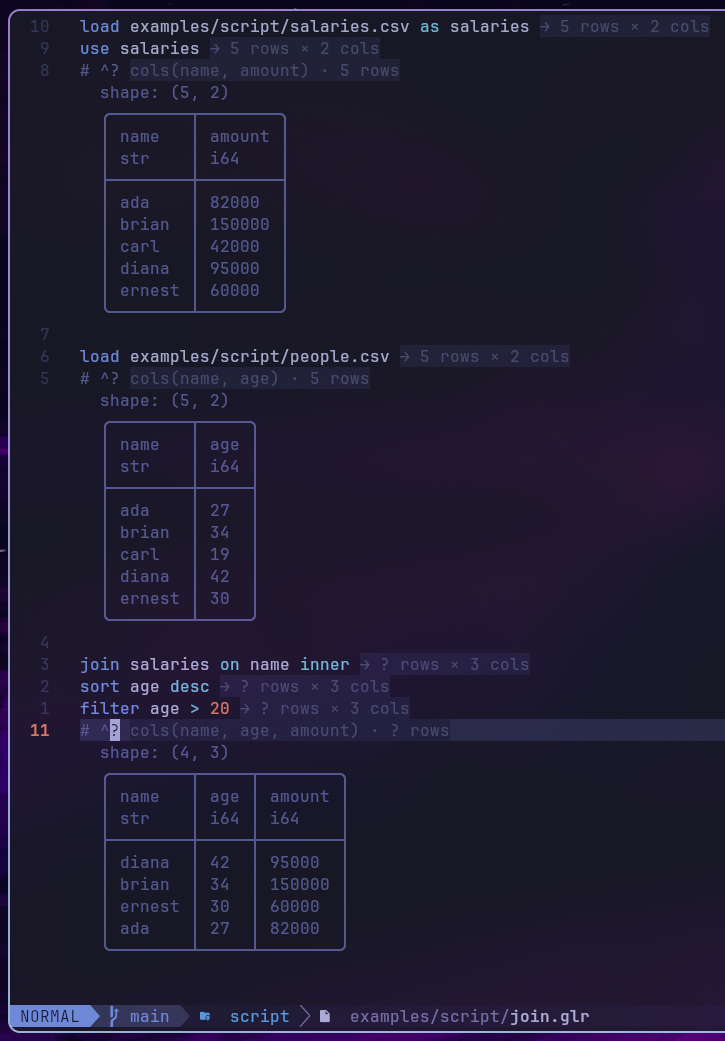
cmd/golars-lsp is a minimal Language Server
that ships:
- Inline completions for commands, staged-frame names, file paths, and column names read from loaded CSV files.
- Inlay hints showing each pipeline step's output shape -
→ 5 rows × 3 colsappears at the end of every shape-changing statement. Row counts propagate as upper bounds:limit Nclamps toN, left joins preserve the left side's count, filters and inner joins mark rows?. - Hover docs with signature + long description on any command token.
- Diagnostics for unknown commands and files that don't resolve.
# ^? probe: live table previews
Drop # ^? on its own line anywhere in a script and the Neovim
plugin renders the focused frame's current table as virtual text
below the comment (via a golars --preview subprocess). This is the
scripting equivalent of Twoslash/Quokka probes: a live peek at the
data at that pipeline position:
load data/trades.csv
filter volume > 100
sort amount desc
limit 5
# ^?
The preview updates on save + debounced text changes; configure via
require("golars").setup({ preview_cmd = { "/path/to/golars" }, preview_rows = 20, preview_timeout_ms = 3000 }). Set preview = false
to disable.
golars --preview <path>
Invoke the preview pipeline from any editor, or manually via:
golars --preview path/to/script.glr
golars --preview path/to/script.glr --preview-rows 25
Runs the script silently (no banner, no trace, no success chrome) and prints exactly one rendered table: the focused pipeline's head. Exit code 0 on success, non-zero on script error (message on stderr).
What this language is NOT
- No variables beyond the named-frame registry. If you need
branching or reusable expressions, write a Go program that
drives
script.Runnerwith your own logic. - No control flow (no
if, no loops). The idiom for conditional runs is shell scripting aroundgolars run, or a Go host with anExecutorthat dispatches. - No user-defined functions.
with NAME = EXPRcovers derived columns; anything beyond that belongs in Go, where the full expression API is available.
The design target is "drop a day of REPL work into a file and have it run again tomorrow." Everything else is out of scope.